


MusicLab:AI Song & Music Video
4.5401.00 Reviews
App Specs
- Version
- 1.4.6
- Updated On
- License
- Free
- Downloads
- 1,000,000+
- Developer
- AI Song & Music Maker & AI Video & AI Photo
- Categories
- Music & Audio
- Platform
- Android
Screenshots
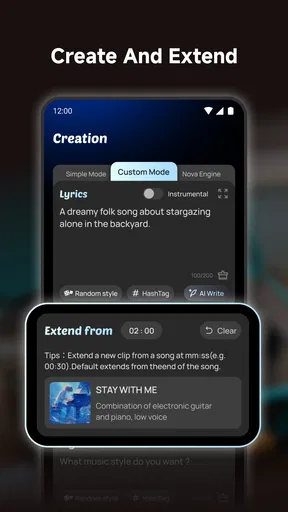
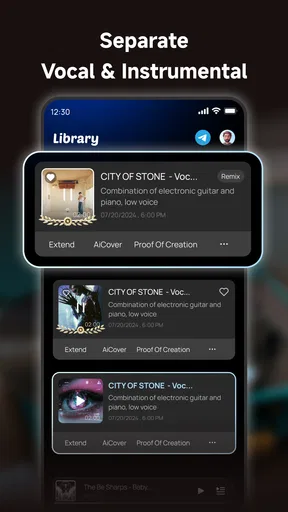
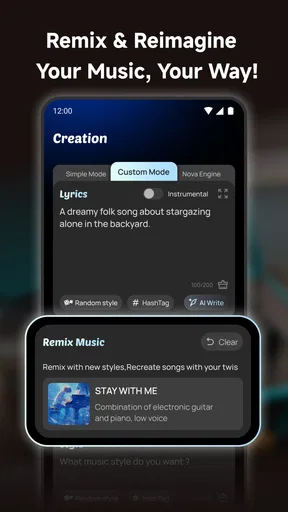
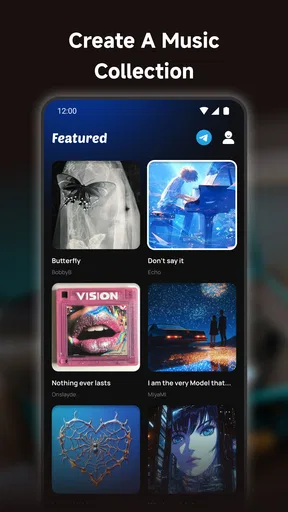
 Analysis by AppCompare
When I want to turn a loose musical idea into something I can actually play back, I prefer a tool that gets me moving before I have to learn a full production setup. MusicLab: AI Song & Music Video is aimed at that quick-start moment: making a song with AI assistance and, for creators who want a visual companion, putting a music video together too. I see it as a place to experiment and shape a draft, rather than a replacement for a dedicated studio or a shortcut to a finished professional release.
A quick route from a prompt to a first idea
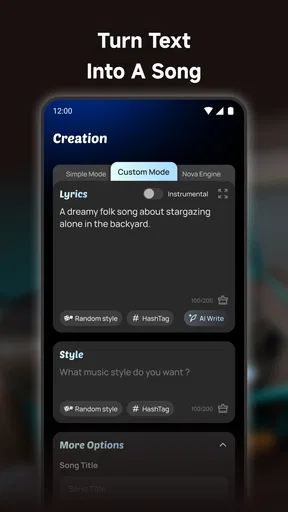
The appeal here is that you can begin with a broad direction instead of opening a blank multitrack project. The app is presented as a way to create songs in different styles, including rap and rock, so it makes sense for someone who has a mood or genre in mind but not yet a melody. I would treat the first result as a sketch: listen for the part that catches your ear, then decide what needs changing rather than expecting the initial output to match a fully developed concept.
That distinction matters if you are comparing it with a conventional music-making app. A traditional digital audio workstation gives you more direct control over recording, editing, and arranging, but it can take longer to get a first idea down. MusicLab’s AI-led approach is more approachable for a quick experiment; the trade-off is that it may not suit a musician who wants precise control over every note, performance, and production choice.
Making a useful draft, not just pressing generate
In my experience, the best way to use a song generator is to give each attempt a clear purpose. For example, I might explore a chorus idea, test whether a lyric fits a rap direction, or make a short backing concept for a personal video. A narrow goal makes it easier to judge a result than asking for a complete, release-ready song all at once. If the first take is not quite right, changing one part of the brief at a time can also make comparisons more meaningful.
MusicLab sits in the Music & Audio category, and its developer is AI Song & Music Maker & AI Video & AI Photo. It is free to install, with in-app purchases ranging from $0.99 to $199.99 per item, so I would check the purchase details before committing to a workflow that depends on repeated generation. Its average rating is 4.5 from around 33,000 ratings, and it has over one million installs. Those figures suggest that many people are willing to try it, but they do not tell me whether its creative controls will suit a particular project.
Where the music-video side fits
The video-making angle gives the app a practical use beyond listening to a rough song. If I have a track idea that I want to share in a social post, a visual can help it feel more complete without sending me immediately into a separate editing workflow. That is useful for a casual creator trying to present a musical experiment, though I would still review the finished video carefully: the song and visuals need to feel like they belong together, and an automated result may not match a very specific visual plan.
A realistic use would be making a playful birthday track, checking how it feels with a visual treatment, then sharing the result with friends. For a more serious release, I would treat the app as an early-stage idea tool and move to software that gives me the export, arrangement, and finishing control I need. Before building a project around it, I would also check what sharing or export choices are available in the version I am using, rather than assuming that every destination or file format will fit my needs.
Worth Reading Before You Choose

Flipboard Shows What News Apps Must Do Beyond the Feed

Switching to Android Auto Means Rethinking Your Driving Routine

Google Calendar Makes a Crowded Week Easier to Manage

Ludo King Makes the Most of the Minutes Between Plans

Baby Panda World Brings Quick Play to Modern Phones, but Its Game Library Feels Busy

ESPN’s Live Game View Makes Following Close Games Easier
Who will enjoy it, and who may want more control
I think MusicLab is most appealing to curious beginners, people who enjoy trying different musical directions, and creators who want a quick soundtrack concept without first learning a complex workstation. It can also be handy when I need a playful starting point for a short personal project and do not mind refining the result elsewhere. The app is less suitable if my priority is detailed editing, a predictable professional workflow, or exact control over a performance. In those cases, a conventional recording or production app is likely a better fit.
It is marked for Everyone, runs on Android from version 7.0, and its current version is 1.2.7. Since it is a free app with optional purchases, I would try the basic experience first and make sure the available tools cover my needs before paying for anything. That is especially sensible for a one-off experiment: the value depends on how often I make music and whether the results are useful enough to keep working on.
Getting Started with MusicLab
First things first, downloading and setting up MusicLab: AI Song & Music Video is a breeze. Available for both Android and iOS, it’s just a quick install away from getting you into the world of music creation. Once you fire it up, you’re greeted with an interface that’s both intuitive and appealing, welcoming both novices and seasoned music makers alike.
Features That Stand Out
What really caught my attention are the AI-driven features. This app doesn’t just let you create music; it helps you craft it intelligently. With a few taps, you can generate melodies and harmonies that sound like they came from a seasoned composer. The AI works its magic by suggesting chord progressions and even helping you tweak your tunes to perfection.
That kind of assistance is most useful when I am stuck between several directions. Rather than treating every suggestion as something to keep, I listen for a small element worth carrying forward—a contour, a harmonic movement, or simply a change in energy. A generated part can be a prompt for my own next step, even when the full result is not the sound I had in mind.
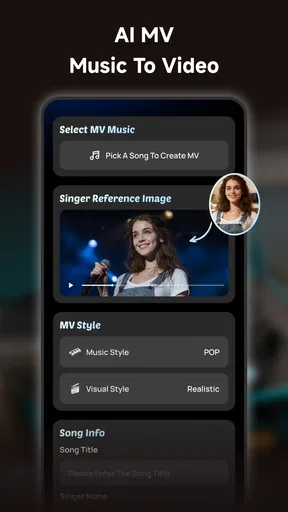
Another gem is the music video creation feature. You can pair your tracks with some stunning visuals, all within the app. It’s like having a mini music studio right in your pocket. Whether you're creating a video for a song you just composed, or adding visuals to an existing track, the process is smooth and quite satisfying.
For a more coherent handoff, I would decide what the video is meant to do before I start: announce a track, set a mood, or simply give friends something fun to watch. That small choice helps me judge whether the visuals support the music, instead of accepting a polished-looking pairing that does not communicate the idea. The built-in approach is convenient, but a creator with a carefully planned edit may prefer a dedicated video editor for finer timing and visual control.
- AI-generated melodies and harmonies
- Music video creation with built-in templates
- Easy-to-use interface
- Seamless sharing options
Creating Your Masterpiece
Once I started playing around with the app, I was hooked. The creation process is quite straightforward. You start by selecting a genre or mood, and the AI suggests a base melody. From there, you can adjust instruments, tempo, and layers to suit your taste. The app supports a variety of instruments and effects, giving you plenty of room to experiment.
My practical tip is to change one thing at a time after a promising first pass. If I switch the style, tempo, and instrument choices together, I cannot tell which change improved the draft. Keeping a simple note of what I asked for and what I liked also helps me return to a promising direction instead of generating variations without a clear decision. This is a lightweight creative habit, not extra technical work.
Another neat feature is the collaborative aspect. If you're working on a project with friends or fellow musicians, the app allows you to share your progress and let others contribute. It’s a great way to co-create and bring different styles together, making it more than just a solo endeavor.
For collaboration, I would agree on a specific contribution before passing a project around: one person can judge the mood, another can suggest a lyrical angle, and someone else can compare which draft better fits the intended audience. That keeps feedback focused and avoids a group of people making unrelated changes. If a project needs formal version tracking or a precise division of production roles, I would use a more specialized collaborative setup alongside this kind of quick idea-making.
Sharing Your Music
Once you have your track and video ready, sharing it is as easy as pie. MusicLab provides direct links to various social media platforms and music sharing sites. Whether you want to showcase your work on Instagram or share it with your friends on Facebook, the app makes it seamless. Plus, if you’re looking to get feedback from the community, there are in-app options to share your tracks with other MusicLab users.
I would think of sharing as a separate creative step, not an automatic finish line. A friend’s reaction can tell me whether a hook is memorable or whether a video makes the tone clear, but that feedback is most useful when I ask a focused question. If I am preparing material for a public channel, I would listen and watch the final version once more before posting, checking that the result represents what I intended rather than relying on the convenience of a one-tap handoff.
Why You Should Try It
If you're someone who's always wanted to create music but felt intimidated by complex software, this app is your gateway. It doesn’t overwhelm you with too many technical details but offers just enough to let your creativity flow. The combination of AI assistance and easy navigation makes it accessible to everyone, from hobbyists to budding musicians.
It is not the right choice for every creative brief. I would skip it if I needed exact control over a recording session, detailed arrangement work, or a dependable final-production pipeline in one place. I would also avoid paying for optional items before establishing that the app’s style and workflow match my habits. For a quick idea, a casual song, or a visual post, its convenience is the stronger argument; for precision, a dedicated music workstation is the safer choice.
A friendly tool for the first stretch
So, if you're ready to unleash your inner musician, give MusicLab: AI Song & Music Video a shot. It’s a fun, engaging, and powerful tool that brings the joy of music creation straight to your fingertips. Happy creating!
My recommendation is to approach it with a small, concrete goal: make a rough chorus, test a genre you would not normally choose, or build a shareable music-and-visual idea for a personal moment. That makes it easier to tell whether the app is earning a place in your creative routine. For me, its best role is as a low-pressure starting point that can turn curiosity into a draft; what happens after that depends on how much control the finished piece needs.
Pros
- AI-generated music is high quality.
- Simple interface for easy navigation.
- Offers a vast library of styles.
- Quick song creation process.
- Regularly updated with new features.
Cons
- Limited free version features.
- Requires internet for full functionality.
- Occasional AI glitches in output.
- High battery consumption.
- Subscription can be pricey.
FAQs for MusicLab:AI Song & Music Video
What is MusicLab: AI Song & Music Video?
MusicLab: AI Song & Music Video is a creative application that allows users to compose songs and create music videos using AI technology. The app provides tools for generating melodies, lyrics, and video visuals, making it accessible for both beginners and experienced musicians looking to experiment with AI-driven music creation.
How does the AI in MusicLab assist with music creation?
The AI in MusicLab analyzes user inputs and preferences to suggest melodies and lyrics. It can generate full compositions or assist in refining user-created pieces. The AI also helps in video creation by syncing visuals with the music, offering a seamless integration of audio and visual elements.
Is MusicLab suitable for beginners with no music experience?
Yes, MusicLab is designed to be user-friendly for beginners. The app offers intuitive interfaces and guided tutorials to help users understand the basics of music and video creation. The AI assists with generating music and visuals, allowing users to create professional-quality content without prior experience.
What platforms is MusicLab: AI Song & Music Video available on?
MusicLab is available for both Android and iOS devices. Users can download the app from the Google Play Store or the Apple App Store, making it accessible to a wide range of smartphone and tablet users who are interested in exploring AI-driven music and video creation.
Are there any costs associated with using MusicLab?
MusicLab offers both free and premium versions. The free version provides basic features, while the premium version unlocks advanced tools and options for a subscription fee. Users can choose the version that best fits their needs and budget, allowing for flexibility in how they use the app.


